Best Budget Laptops Under $500 in 2026 - Don't Buy Until You Read This
The Honest Truth Nobody Tells You About Budget Laptops
Let me start with something real.
Every single year, millions of people type "best laptop under $500" into Google. They get hit with a wall of flashy headlines, affiliate links, and laptop lists written by people who probably use $2,000 MacBooks in real life.
Then they buy the wrong laptop. It lags. It dies in two years. They blame themselves.
I am going to end that cycle today.
I spent weeks going through every credible review, benchmark test, and real-user report on budget laptops in 2026. No sponsored opinions. No padding. Just the honest answer to the question: what is actually worth your $500 right now?
The answer might surprise you. Because 2026 is genuinely a different year for budget laptops. The gap between cheap and good has quietly, dramatically closed.
Why Budget Laptops in 2026 Are Actually Good Now...?
Almost three years ago, buying a laptop under $500 was a gamble. You were either getting a sluggish machine with 4GB of RAM that struggled to open Chrome, or a Chromebook that locked you out of half the software you needed.
That story has changed.
Intel's N-series processors, DDR5 RAM appearing at sub-$400 price points, and NVMe SSDs in budget machines have completely rewritten the rules. You can now get 16GB of RAM and a 512GB SSD for under $400. That is not a typo. That configuration would have cost you $800 two years ago.
The result? Budget laptops in 2026 handle everyday tasks — browsing, writing, streaming, Zoom calls, spreadsheets — with genuine smoothness. They are not powerhouses. They will not edit 4K video without complaining. But for 80 percent of people's real daily use, they are more than enough.
Here are the five that actually matter.
1. Acer Aspire Go 15 — Best Overall Pick Under $500
Price: $269 – $449 | Windows 11 | 15.6-inch FHD IPS
PIC Credit: root-nation.com
If there is one laptop I would confidently hand to a student, a freelancer, or anyone on a tight budget in 2026, it is this one.
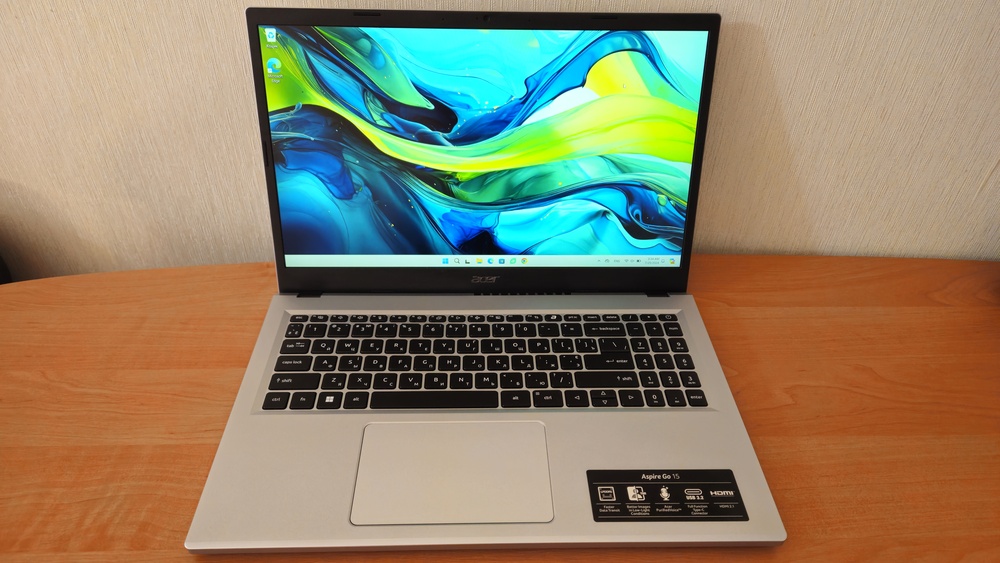
The Acer Aspire Go 15 has done something remarkable: it starts at $269 and gives you a 15.6-inch Full HD IPS display, Intel Core i3-N355 processor with 8 cores, and 8GB DDR5 RAM. Go up slightly to the $399 variant and you get 16GB RAM and a 512GB SSD. That combination at that price is almost unreasonable value.
Reviewers across PCWorld, TechRadar, and Tom's Guide consistently praise its keyboard — genuinely comfortable with good key travel and a full-size numpad that most laptops at this price strip out. The build quality, while plastic, does not feel cheap or fragile. One reviewer accidentally dropped it off a couch during testing and it survived without a scratch. That tells you something real about durability.
The display is solid — 1080p, decent brightness, good enough for daily use and video streaming. The webcam handles Zoom calls acceptably. Battery life hits close to 12 hours in movie playback tests.
But here is what you need to know before buying: The base Core i3-N355 model is fine for light tasks. If you plan to run heavier workloads — multiple apps, large spreadsheets, or any kind of editing — go for the Core i5 variant. There is a significant performance jump between the N-series and U-series chips, and it is worth the extra $50 to $80.
The one thing Acer inexplicably skipped: no keyboard backlight. In 2026, on a laptop that costs nearly $500 in its higher configurations, that is a legitimate frustration. Typing in a dark room or coffee shop at night becomes a guessing game.
Bottom line: The Acer Aspire Go 15 is the best value laptop available under $500 in 2026. Full stop.
2. ASUS Chromebook Plus CX34 — Best Chromebook Pick
Price: $325 – $400 | ChromeOS | 14-inch FHD
PIC Credit: Asus.com
Before you scroll past this because it says "Chromebook" — hear me out.
The ASUS Chromebook Plus CX34 is the best argument for ChromeOS in 2026. The "Plus" branding is not marketing noise. It means this device meets Google's elevated specifications for Chromebook Plus: at minimum a 1080p display, 8GB RAM, and a capable processor. This one delivers all three and then some.
The display is noticeably better than most Windows laptops at this price — sharper, brighter, with more accurate colours. Battery life pushes beyond 10 hours in real use. ChromeOS is fast, secure, and requires essentially zero maintenance. No antivirus headaches, no Windows update interruptions at the worst possible time, no bloatware.
Google also baked in AI features that are genuinely useful rather than gimmicky — real-time video captioning, photo editing tools, and text generation that would normally require a much more expensive machine.
Who is this NOT for: If your work requires desktop software — Adobe Photoshop, Microsoft Office locally installed, specialised professional tools — ChromeOS is not your answer. It lives and breathes in the cloud. If 90 percent of what you do is browser-based, streaming, Google Docs, and communication, this laptop will serve you better than most $700 Windows machines.
Bottom line: The best-built, best-display laptop on this list. Perfect for students and cloud-first workers.
3. Dell Inspiron 15 3520 — Best for Students and Reliability
Price: $449 – $500 | Windows 11 | 15.6-inch FHD
PIC Credit: Dell.com
Dell has been making the Inspiron 15 for what feels like forever. And there is a reason it never disappears from best-budget lists: it simply works, and Dell stands behind it.
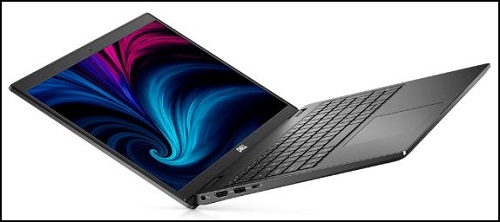
The Inspiron 15 3520 packs an Intel Core i5-1235U — a genuine 10-core 12th-generation processor that handles multitasking with real headroom. Running Zoom on one side, 15 browser tabs on the other, and a Microsoft 365 document open simultaneously does not break a sweat on this machine.
What separates Dell from Acer at this price is two things: the keyboard has a backlight (something Acer forgot), and Dell's support infrastructure is significantly better. If you are a student who cannot afford a broken laptop during exam season, Dell's warranty support and repair network is not a small detail. It is peace of mind.
Dell also frequently offers student discounts that can bring this below $400, which makes the value proposition even sharper.
The catch: 8GB RAM on some configurations feels tight in 2026 for heavy multitaskers. If you can find the 16GB variant, take it. Also, battery life trails behind the Acer Go 15 — closer to 7 to 8 hours in real use rather than 10 to 12.
Bottom line: The most reliable budget Windows laptop you can buy. Not the flashiest, but it will not let you down when it matters most.
4. Lenovo IdeaPad Flex 5i Chromebook Plus — Best 2-in-1
Price: $349 – $450 | ChromeOS | 14-inch FHD Touchscreen
PIC Credit: Lenovo.com
Sometimes you want a laptop. Sometimes you want a tablet. The Lenovo IdeaPad Flex 5i gives you both without forcing you to choose.
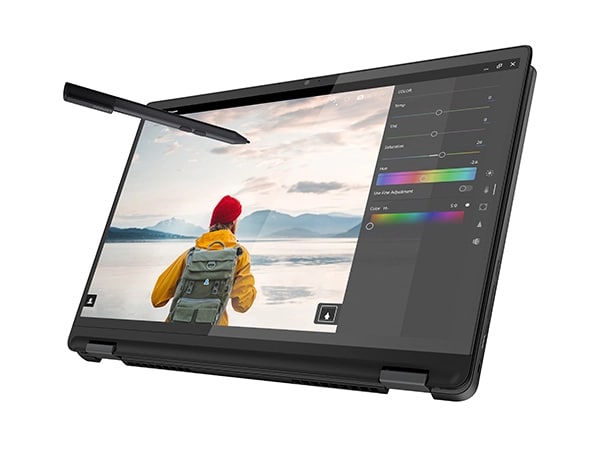
The 360-degree hinge is genuinely well-built — it does not wobble, does not creak, and transitions smoothly between laptop, tent, and tablet modes. The touchscreen is responsive. The 14-inch display is sharp and pleasant to use in any orientation.
For students who use their laptop for research and reading as well as writing — flipping into tablet mode for an e-book or a lecture PDF is a genuinely useful daily habit, not just a spec on a box.
Battery life matches ChromeOS expectations: comfortably over 10 hours in mixed use. Performance is smooth for everyday tasks. Build quality, by Lenovo standards, is solid and inspires more confidence than most budget machines.
The honest caveat: The keyboard and trackpad are good but not exceptional. If you type heavily all day, the Acer Go 15 or Dell Inspiron 15 have better keyboards. The Flex 5i shines when versatility is what you actually need.
Bottom line: The best 2-in-1 laptop under $500 in 2026. If you want a device that doubles as a tablet without compromise, this is your pick.
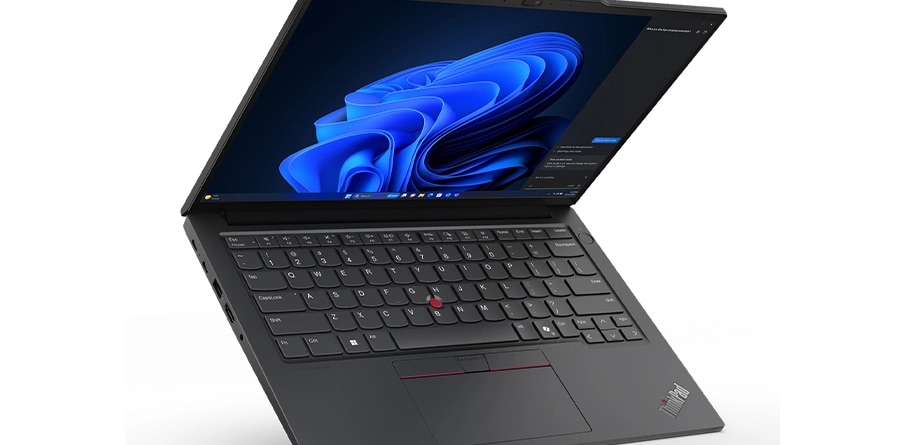
5. Refurbished Lenovo ThinkPad E14 — The Underrated Genius Move
Price: $400 – $500 (Refurbished) | Windows 11 | 14-inch FHD
PIC Credit: Lenovo.com
This one will surprise you. And it should be on every budget buyer's radar.
A refurbished Lenovo ThinkPad E14 or E15 at $400 to $500 often gives you an Intel Core i5 from a later generation, 8 to 16GB RAM, a 256 to 512GB SSD, and ThinkPad's legendary build quality and keyboard — all for the price of a new budget laptop that cannot match it.
ThinkPad keyboards are genuinely in a different league. Professionals who type for hours every day choose ThinkPads for a reason. The build quality is business-grade. The repairability is excellent — RAM and SSD are usually upgradeable, which almost no new budget laptop under $500 allows.
Yes, it is used. Yes, the battery health may not be 100 percent. Yes, the warranty is limited. But if you buy from a reputable refurbisher and check the battery condition, a ThinkPad at this price range beats almost every new budget machine on raw performance and keyboard quality.
Bottom line: The smartest possible move for a power user on a budget. Buy used, get more machine for your money.
The Comparison You Need
Laptop | Price | Best For | Battery | Verdict |
|---|---|---|---|---|
Acer Aspire Go 15 | $269–$449 | Best overall value | ~12 hrs | Top Pick |
ASUS Chromebook Plus CX34 | $325–$400 | Cloud users, students | 10+ hrs | Best Chromebook |
Dell Inspiron 15 3520 | $449–$500 | Reliability, students | 7–8 hrs | Most Reliable |
Lenovo Flex 5i Chromebook | $349–$450 | Versatility, 2-in-1 | 10+ hrs | Best 2-in-1 |
Refurb ThinkPad E14 | $400–$500 | Power users, typists | Varies | Underrated Gem |
What to Look For Before You Buy — The BS Insider Checklist
Before you click "Add to Cart" on any laptop under $500, run through this:
RAM: 8GB is the absolute minimum in 2026. 4GB is genuinely painful. If you can get 16GB, take it — it will make the laptop feel fast two years from now.
Storage: NVMe SSD is fast and snappy. eMMC storage is sluggish — avoid it if possible. Never buy a 64GB machine in 2026.
Display: Look for 1080p Full HD IPS. Anything less will frustrate you within a month. Avoid TN panels — they have terrible viewing angles.
Processor: Intel N-series chips (N100, N305, N355) are decent for light tasks. Intel Core i5 U-series or AMD Ryzen 5 give you real headroom. Know what you need before buying.
Battery: Anything under 7 hours real-world is a problem. ChromeOS laptops almost always win on battery at this price range.
No backlit keyboard: Inconvenient but survivable. Do not let it be the only reason you skip a great machine — but factor it in.
The Final Word
Here is the truth about budget laptops in 2026: you no longer have to apologize for buying one.
The days of $500 laptops being slow, embarrassing machines that gave up after 18 months are mostly over. The Acer Aspire Go 15 proves that clearly. Sixteen gigabytes of RAM and a 512GB SSD under $400 is not a budget compromise. That is a genuinely capable machine.
Buy based on your actual life — not the specs you saw in a YouTube thumbnail. A student who lives in Google Docs does not need a Windows machine. A writer who works in coffee shops needs a backlit keyboard. A person who reads more than they type should seriously look at the Flex 5i.
Know yourself. Then buy the right machine.
That is what BS Insider is here for.
Bilal Salfi | MIT Qualified